Smart-ID app could not be launched!
If you are not on a mobile device with Smart-ID app installed, please return to the login page and use the QR code option.
It is not possible to open Smart-ID app from Huawei browser. Please use some other browser as your default.
The recommended browser on Android is Chrome, which support Universal links without any further configuration.
In order to launch the Smart-ID app from a web page or app in a mobile browser, the browser must support Universal links.
Safari, Chrome, Firefox, Edge and Samsung Internet browsers support these features, however some require additional configuration.
Other browsers may or may not support Universal links.
The recommended browser on iOS is Safari, which supports Universal links without any further configuration. We recommend switching to Safari and re-opening the web page where you tried to log in.
In certain conditions it might be necessary to explicitly allow opening Smart-ID links.
Follow these 2 steps while in Safari browser:
- Step 1: Press and hold your finger on this link until a menu is shown: https://www.smart-id.com/
- Step 2: Select "Open in Smart-ID" from the menu.
If this does not work, try restarting the device.
The recommended browser on Android is Chrome, which support Universal links without any further configuration.
Follow these steps while in Edge browser:
Step 1: Tap the menu button and then tap Settings
Step 2: Tap on "Privacy, security and services"
Step 3: Scroll down and click on "Block opening external apps"
Step 4: Disable it
If above steps do not apply, you may be able to check "Remember my choice" on pop-up and select "Open external app"
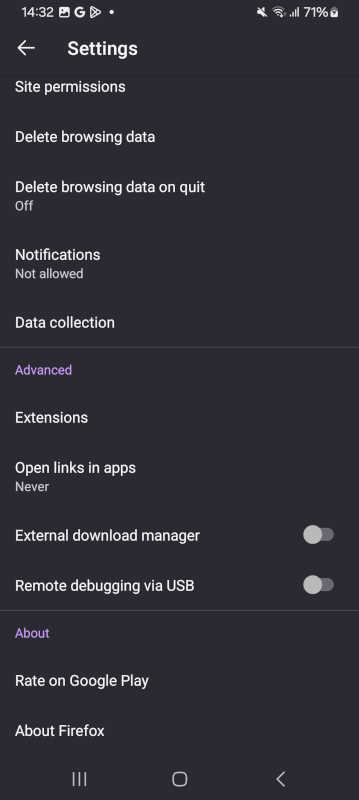
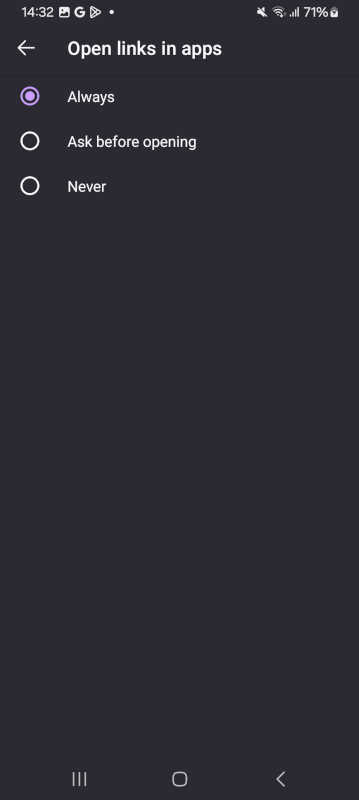
Follow these 3 steps while in Firefox browser:
Step 1: Tap the menu button and then tap Settings

Step 2: Tap on "Open links in apps"
Step 3: Select "Always"
Follow these 3 steps in the Samsung Internet browser:
Step 1: Open Samsung Internet Settings
Tap the menu in the bottom-right corner (three lines icon).
Step 2: Open "Privacy dashboard"
It is located under the button with the shield icon labeled “Privacy”.
Step 3: Toggle off "Block opening external apps"
After this, Smart-ID+ features will work on your phone with the Samsung Internet browser.
Follow these steps:
Step 1: click the green lock icon next to the URL
Step 2: select "Site settings"
Step 3: toggle "Always open in app" to ON
Join the digital revolution and download the Smart-ID app for free onto your smartphone or tablet!


Ensure that you are using the latest version of the app.
If the Smart-ID app do not open even after following the above instructions, try re-starting the browser / phone.